
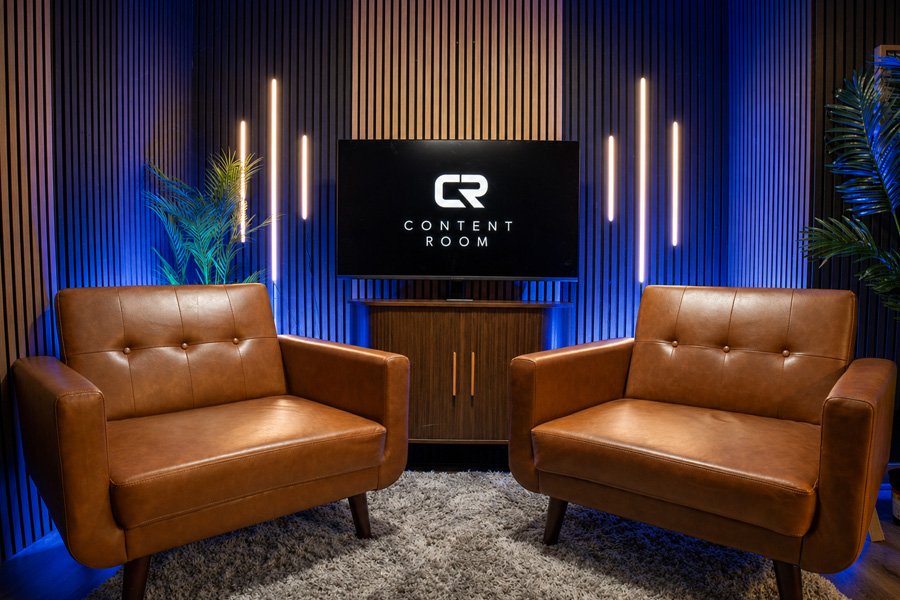
A great podcast episode may sound like a natural conversation, but producing one requires careful planning. The host needs to prepare the topic, research the guest, organize the recording space, test the equipment, and create a plan for editing and publishing the episode.
Skipping any of these steps can lead to poor audio, awkward pauses, missing files, or an episode that does not have a clear purpose.
Working with a professional studio can simplify Podcast Recording by giving creators access to reliable equipment, a controlled environment, and technical support. However, even in a professional studio, the host must arrive prepared.
This checklist explains what to do before, during, and after your session so you can produce stronger episodes and make better use of your recording time.
Before Your Podcast Recording Session
The work you complete before arriving at the studio can have a major effect on the final episode. Preparation helps the conversation move naturally and reduces the amount of editing required afterward.
Define the Purpose of the Episode
Every episode should give the audience a reason to listen.
Before choosing questions or inviting a guest, write down the main purpose of the episode. Ask yourself what listeners should know, understand, or feel by the end.
Your episode might be designed to:
- Teach the audience a useful skill
- Answer a common customer question
- Share an expert’s experience
- Explain a complicated topic
- Discuss a recent industry development
- Entertain listeners with a story
- Introduce a product, service, or organization
- Encourage listeners to take a specific action
Avoid trying to cover too many unrelated ideas in one episode. A focused subject is easier for the host to manage and easier for the audience to follow.
Choose the Right Podcast Format
The recording process may change depending on the format of your show.
Common formats include:
- Solo commentary
- One-on-one interviews
- Co-hosted conversations
- Panel discussions
- Educational episodes
- News and industry updates
- Storytelling shows
- Question-and-answer episodes
- Video podcasts
- Remote interviews
A solo episode may require a detailed outline or script. An interview needs well-researched questions. A panel discussion may need clear rules so several guests do not speak over one another.
Spotify for Creators provides an overview of several podcast formats that can help new hosts choose a structure for their shows.
Research Your Topic
Even experienced hosts should research the subject before recording.
Collect useful facts, examples, stories, statistics, and questions that can support the discussion. Check important details using reliable sources rather than depending only on memory.
Research is especially important when discussing technical subjects, current events, health, finance, law, or other topics where incorrect information could mislead the audience.
Create a short list of the most important points, but do not overload the episode with too much information. Your notes should support the conversation rather than turn it into a lecture.
Research Your Guest
If the episode includes a guest, learn about their background before the session.
Review their website, professional profile, previous interviews, current projects, and areas of expertise. This allows you to ask more specific questions and avoid repeating information the guest has already shared many times.
Good interview questions are usually open-ended. They encourage the guest to explain an idea, share an experience, or tell a story.
Instead of asking, “Did you enjoy starting your business?” you could ask, “What was the most difficult part of starting your business, and how did you handle it?”
Spotify’s guide to podcast interview questions recommends researching the guest, asking open-ended questions, and using follow-up questions when an answer introduces an interesting subject.
Create an Episode Outline
An outline gives your episode structure without requiring you to read every sentence from a script.
A simple outline may include:
- Opening statement
- Introduction of the topic
- Guest introduction
- First main question
- Supporting questions
- Key examples or stories
- Final lesson or takeaway
- Call to action
- Closing statement
Keep the outline where you can see it during the recording. You can use printed notes, a tablet, a monitor, or a teleprompter depending on your format and personal preference.
Do not feel that you must follow every question in order. A good conversation may move in an unexpected but useful direction. The outline is there to help you return to the main subject when needed.
Decide Whether You Need a Script
Some podcast formats benefit from a complete script.
Scripts may be useful for:
- Solo educational episodes
- Advertisements and sponsor messages
- Podcast introductions
- News summaries
- Narrated stories
- Legal disclaimers
- Calls to action
- Short promotional videos
Interviews usually sound more natural when the host uses an outline instead of reading every question word for word.
Spotify offers a guide on writing podcast scripts that explains how creators can structure different parts of an episode.
Confirm the Recording Details With Your Guest
Send your guest the important information several days before the session.
Include:
- Recording date
- Arrival time
- Studio address
- Expected episode length
- Main discussion topic
- Whether video will be recorded
- Clothing recommendations
- Parking instructions
- Contact information
- Estimated completion time
Content Room Studios is located at 1025 Westhaven Boulevard in Franklin, Tennessee. The studio is appointment-only, and free on-site parking is available. Additional information about appointments, studio policies, remote guests, and file delivery can be found on the Content Room Studios FAQ page.
Select Clothing for Video Recording
Clothing may not matter for an audio-only podcast, but it can affect how a video episode looks.
Choose clothing that is comfortable and fits the visual style of your brand. Avoid distracting patterns, noisy jewelry, or materials that may rub against the microphone.
You may also want to bring an extra jacket or shirt when recording several episodes during one session. A small wardrobe change can give each episode a different appearance.
If your brand uses specific colors, ask whether the studio lighting or background can be adjusted to complement them.
Prepare Your Call to Action
A call to action tells the audience what to do after the episode.
You might ask listeners to:
- Subscribe to the podcast
- Watch another episode
- Visit your website
- Download a free guide
- Join an email list
- Follow your social media account
- Contact your business
- Book a consultation
- Leave a review
- Share the episode
Choose one primary action whenever possible. Giving the audience too many instructions at once may reduce the chance that they complete any of them.
Book Enough Studio Time
Do not schedule only enough time for the exact planned length of the episode.
A 45-minute podcast may require additional time for arrival, setup, sound checks, introductions, breaks, retakes, photographs, and closing clips.
Content Room Studios offers professional audio and video production in a space designed for podcasters, businesses, agencies, and creators. You can review the equipment and recording environment on the studio page.
Businesses planning to create episodes regularly can also review the available content production memberships.
During Your Podcast Recording Session
Once recording begins, your attention should move away from technical concerns and toward the conversation.
Arrive Early
Arriving early gives you time to settle in, review your outline, speak with the engineer, and make small adjustments before recording begins.
Rushing into the studio at the last minute can affect your energy and make the opening of the episode feel uncomfortable.
Use the extra time to:
- Drink water
- Silence your phone
- Review guest information
- Check name pronunciations
- Confirm the episode title
- Discuss the recording format
- Review your call to action
- Ask any final technical questions
Complete a Sound Check
Never assume the microphone levels are correct without testing them.
During the sound check, speak at the same volume you expect to use during the episode. If you speak quietly during the test but become louder during the conversation, your audio may become distorted.
The engineer may adjust microphone placement, input levels, headphones, seating positions, and camera framing.
Content Room Studios includes an engineer who assists with setup, recording, and file delivery, allowing hosts and guests to focus on creating content.
Maintain a Consistent Microphone Position
Moving too far away from the microphone can make your voice sound quiet or distant. Moving too close may create harsh breathing sounds, popping noises, or distortion.
Spotify’s podcast microphone guide recommends testing microphone distance and position while listening for background noise, popping sounds, and distortion.
Try to maintain a consistent position throughout the episode. Avoid turning your head far away from the microphone while speaking to your guest.
When recording video, the microphone should also be positioned so it captures clear audio without unnecessarily blocking the host’s or guest’s face.
Wear Headphones When Appropriate
Headphones allow hosts, guests, and engineers to hear the audio as it is being recorded.
They can help identify problems such as:
- Clothing touching the microphone
- Background noise
- Audio feedback
- Poor microphone placement
- Volume differences
- Connection problems with remote guests
Some guests may find headphones unfamiliar at first. Give them a few minutes to adjust the volume and become comfortable before starting the main conversation.
Slow Down
People often speak faster when they are nervous or excited.
Speaking too quickly can make the episode difficult to follow and may increase the number of mistakes. Slow down, pronounce important words clearly, and leave small pauses between major points.
Short pauses are not a problem. They can make editing easier and give the audience time to understand an important idea.
Listen to Your Guest
A strong interview should feel like a conversation, not a list of questions.
Listen carefully to each answer instead of preparing your next question while the guest is speaking. The best moments often come from thoughtful follow-up questions.
Useful follow-ups include:
- “What happened next?”
- “Can you explain that further?”
- “Why was that important?”
- “What did you learn from that experience?”
- “Can you give an example?”
- “What would you do differently today?”
- “How can listeners apply that lesson?”
Your outline should guide the episode, but it should not prevent you from exploring an unexpected and valuable answer.
Avoid Talking Over the Guest
Natural conversations sometimes include interruptions. However, frequent overlapping speech can make the episode harder to understand and more difficult to edit.
Allow the guest to complete their thought before responding. Use eye contact and body language to show that you are listening.
During a remote interview, a slight internet delay may make interruptions more common. Pause briefly before responding so you know the guest has finished.
Keep Water Nearby
A dry mouth can create clicking sounds and make speaking uncomfortable.
Keep room-temperature water within reach. Avoid constantly drinking during the guest’s answers, especially when cameras are recording.
Some hosts also limit carbonated drinks, heavy meals, and dairy immediately before recording because these may affect the voice or create unwanted sounds.
Mark Mistakes Without Stopping the Entire Session
Not every mistake requires restarting the episode.
When you misspeak, pause, repeat the sentence clearly, and continue. The incorrect section can often be removed during editing.
You can also tell the engineer that you want to repeat a section. Leaving a short pause before and after the correction makes the edit easier to identify.
Stopping after every small mistake may disrupt the natural energy of the conversation.
Record More Than the Main Episode
Once the full episode is complete, use the remaining studio time to record supporting content.
This may include:
- A podcast introduction
- A brief episode summary
- Sponsor messages
- Calls to action
- Social media clips
- Guest promotional videos
- A teaser for the next episode
- Short educational tips
- Alternate openings
- Behind-the-scenes footage
Creating these materials during the same session can reduce the need to schedule another recording day.
After Your Podcast Recording Session
Finishing the conversation does not mean the production process is complete.
Your recorded files must still be organized, edited, reviewed, published, and promoted.
Confirm File Delivery
Before leaving, confirm how and when the recorded files will be delivered.
Ask whether you will receive:
- A complete audio recording
- Separate microphone tracks
- Complete video footage
- Individual camera recordings
- A switched video version
- Social media clips
- Edited episodes
- Raw files
- Project files
- Thumbnails
- Show notes
Content Room Studios provides separate audio tracks for microphones and isolated camera footage, according to its studio FAQs. Editing and additional production assistance may also be available depending on the service selected.
Back Up Your Files
Once you receive the recordings, save copies in more than one location.
You could keep the files on:
- Your main computer
- An external hard drive
- A cloud storage service
- A company server
Use clear folder names that include the show name, episode number, guest name, and recording date.
For example:
Podcast-Name_Episode-12_Guest-Name_Recording-Date
Inside the folder, create separate locations for raw files, edited versions, graphics, clips, show notes, and final exports.
Edit for Clarity
Editing should improve the listening experience without removing the personality of the conversation.
Common edits include:
- Removing long pauses
- Reducing background noise
- Correcting volume differences
- Removing repeated statements
- Cutting technical interruptions
- Adding an introduction
- Adding closing music
- Inserting sponsor messages
- Switching camera angles
- Adding names or titles on screen
Do not remove every pause, breath, or natural reaction. Excessive editing can make a conversation sound unnatural.
Apple Podcasts provides audio requirements to help creators maintain clear, consistent sound without excessive loudness or distortion.
Review the Complete Episode
Listen to or watch the entire edited episode before publishing it.
Check for:
- Incorrect information
- Missing sections
- Audio problems
- Awkward edits
- Incorrect names
- Private information
- Broken transitions
- Sponsor placement
- Visual errors
- Incorrect contact details
Send the guest a preview only when that is part of your agreement. Establishing the review process before the recording can prevent disagreements later.
Create a Clear Episode Title
The title should explain what the audience will learn or why the conversation matters.
Avoid titles that are so clever or vague that people cannot understand the subject.
Instead of:
“An Amazing Conversation With Sarah”
Consider:
“How Sarah Built a Local Business Through Community Partnerships”
The second title gives the audience a clear reason to listen.
Write Useful Show Notes
Show notes help the audience understand the episode before pressing play.
Include:
- A short episode summary
- Guest name and biography
- Main subjects discussed
- Important resources
- Guest website
- Social media profiles
- Sponsor information
- Your call to action
- Relevant timestamps
You can also add a transcript to make the episode more accessible and help readers find specific parts of the discussion.
Publish Audio and Video Versions
Audio episodes can be distributed through a podcast hosting provider to listening platforms. Video episodes can be uploaded to YouTube and supported platforms that accept video podcasts.
YouTube allows creators to create a new podcast or turn an existing playlist into one through YouTube Studio.
Recording both audio and video gives the audience more ways to experience the show. Some people may watch the complete conversation, while others prefer listening during work, travel, or exercise.
Repurpose the Episode
One recording can support much more than one podcast upload.
You can turn the episode into:
- Short vertical videos
- YouTube Shorts
- Instagram Reels
- TikTok clips
- LinkedIn videos
- Quote graphics
- Blog articles
- Email newsletters
- Website FAQs
- Audiograms
- Educational carousels
- Promotional advertisements
Choose moments that make sense without requiring the audience to watch the entire episode first.
A strong clip should introduce one clear idea, provide useful information, and encourage viewers to learn more.
Review Performance
After publishing, track how the episode performs.
Useful measurements include:
- Downloads
- Video views
- Listening time
- Viewing duration
- Audience retention
- Subscribers
- Comments
- Social shares
- Website visits
- Email signups
- Contact inquiries
Look for patterns across several episodes rather than judging the show based on one result.
Your performance data may show that the audience prefers certain subjects, guests, episode lengths, or video formats. Use that information when planning future recordings.
Common Podcast Recording Mistakes to Avoid
Even experienced creators can lose time or reduce the quality of an episode by making simple mistakes.
Common problems include:
- Arriving without an outline
- Failing to research the guest
- Booking too little studio time
- Speaking too far from the microphone
- Recording without a sound check
- Interrupting the guest repeatedly
- Forgetting the call to action
- Failing to confirm file delivery
- Losing raw recordings
- Publishing without reviewing the episode
- Creating no promotional content
- Trying to cover too many topics at once
A repeatable checklist makes these problems less likely. After each episode, update your checklist based on what worked and what needs improvement.
Create a Repeatable Recording Process
Successful podcast production becomes easier when each episode follows a clear process.
Start with a focused topic. Research your guest, prepare an outline, and communicate the recording details in advance. During the session, maintain good microphone technique, listen carefully, and record additional promotional content. Afterward, organize your files, review the edit, publish the episode, and repurpose the strongest moments.
Creators who need a professional environment for Podcast Recording can explore the equipment, technical support, studio time, and production services available through Content Room Studios.
To discuss an upcoming project, contact Content Room Studios or book a recording session online.
Guest post provided by Franklin Marketing Co..